


📘 C# Blog Series – Blog 2 “C# Syntax Basics — आसान भाषा में पूरा Foundation”
📘 C# Blog Series – Blog 2
“C# Syntax Basics — आसान भाषा में पूरा Foundation”


अगर आप C# सीखना शुरू कर रहे हो, तो सबसे पहले समझना जरूरी है कि C# कैसे लिखा जाता है, यानी इसकी Syntax कैसी होती है।
यही वो foundation है जो आगे चलकर बड़े सिस्टम, API, Web Apps, Games—सब बनाते समय काम आएगी।
🔹 1. C# Program की Basic Structure
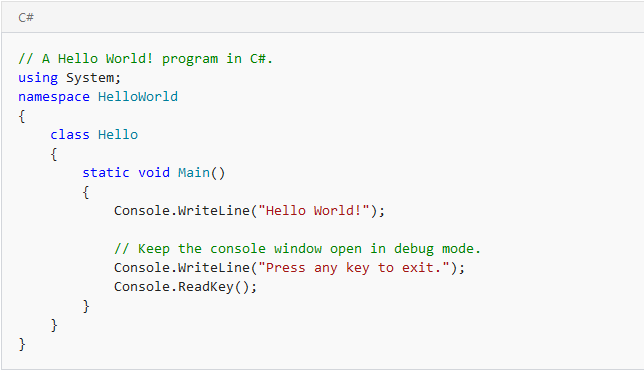
एक basic C# program ऐसा दिखता है:
अब इसे आसान भाषा में समझते हैं:
-
using System;→ System namespace का इस्तेमाल -
class Program→ Program नाम की एक class -
Main()→ Program यहीं से शुरू होता है -
Console.WriteLine()→ Output दिखाता है
यही C# की बुनियादी संरचना है।
🔹 2. Variables — Data Store करने का तरीका
Variables को आप छोटे बक्से समझ लो जिनमें डेटा रखा जाता है।
Common Data Types:
-
int→ Number (जैसे 18, 200) -
string→ Text -
bool→ True / False -
double→ Decimal values
🔹 3. Conditions — If/else (Decision Making)
Real life में हम रोज़ decision लेते हैं:
यदि बारिश है → छतरी ले जाओ
यदि नहीं → मत ले जाओ
C# में ऐसा लिखते हैं:
🔹 4. Loops — Repeat करने के लिए
मान लो आपको किसी list में 10 नाम print करने हैं—
हर बार manually लिखना बेकार है।
Loop इसका solution है।
🔹 5. Functions — Reusable Code
Function मतलब ऐसा code जो बार-बार use किया जा सके।
🔹 6. Arrays — Multiple Data एक साथ
🔥 Real-Life Example (Where This Foundation Is Used?)
Example: Student Result System
School software में हर दिन results generate होते हैं:
-
Marks store करना → Variables
-
पास/फेल चेक → If/Else
-
30 students के marks print करना → Loop
-
Result calculate करने का code → Function
-
सभी students की list → Array
यानी सिर्फ यही basics जानकर आप एक basic school result app बना सकते हैं!
📌 Conclusion
C# syntax बहुत clean है और एक बार basics सीख लिए तो:
-
Web APIs
-
Desktop apps
-
Mobile apps
-
Billing software
-
GPS tracking servers
सब बनाना आसान हो जाता है।




0 Comments
Thanks for Commenting on our blogs, we will revert back with answer of your query.
EmojiThanks & Regards
Sonu Yadav